

Once you start saving coins, a useful app needs to do more than identify them. Can you organize a set, correct a record, keep track of what you paid and take your collection data with you?
This guide compares HeriBase, CoinSnap and CoinIn, three apps with recorded collection features in our coin identifier comparison. Here the focus is collection management. We use the earlier feature records and existing screenshots to explain where each app may fit, and where the evidence is still incomplete.
Which Coin Collection App Fits Your Needs?
| Your priority | App to consider | What to know |
|---|---|---|
| Save coins and view a reference collection total | HeriBase, CoinSnap or CoinIn | All three show saved collections and reference totals. Choose based on the record fields and organization you need. |
| Follow an official set toward completion | HeriBase or CoinSnap | HeriBase shows a paged album and collected count; CoinSnap shows a series directory, count and percentage. CoinIn has no official-set content according to contributor feedback. |
| Add coins, edit records and manage personal sets | HeriBase | The documented workflow includes editable records, batch import and set export. Check the subscription needed for export. |
| Export all coins or an individual set | CoinSnap | The earlier review records all-coin or set export. A supplied official-set menu shows Export; delivered fields still need checking. |
| Keep custom sets and explore trading | CoinIn | Supplied screens show coin-information fields, saved items, Change collection and a collection total. Import and export remain historical observations, not demonstrated by these screens. |
Start with the task that matters most. HeriBase is a candidate for keeping detailed records and bringing existing items into an app. CoinSnap is worth considering when export scope matters. CoinIn is also a candidate for recording coin details and organizing saved items into collections.
What This Comparison Is Based On
We selected the three apps with documented collection features from the earlier identifier article. Each was recorded as supporting personal sets, giving us a relevant starting point for comparing collection workflows. We have not repeated the store-ranking exercise or tested every collection app on the market.
The original identification study was conducted on September 16, 2026: HeriBase 1.3.6, CoinSnap 2.25.0 and CoinIn 1.38.0 on iOS. Its feature and price tables provide historical usage records. Twelve additional CoinSnap screenshots, three HeriBase official-set screenshots and nine CoinIn iPhone screenshots were supplied on September 23, 2026; their app version and subscription state were not supplied. The CoinSnap originals retain their Chinese interface. They document visible forms, saved records and menu choices, rather than a new test performed by us. The other collection screenshots reused here come from the earlier comparison and HeriBase user guide; not every screenshot has a recorded app build. Those versions should not be treated as the versions behind every image.
We distinguish three kinds of evidence: a function visible in a screenshot, a feature recorded in the earlier review, and a workflow that has not been evaluated. In particular, we have not completed a new three-app save–edit–export test. The 12-coin identification results do not measure collection reliability.
The Heritcoin Team publishes this article and offers HeriBase.
MyCoinWorX's software comparison also identifies device access as a selection criterion. If you use your collection at home and at coin shows, check that a record can be reopened where you need it. Cross-device synchronization and offline access have not been established for these three apps in this review.
How Can You Add Coins to a Collection?
Start with the material you already have: a coin in your hand, saved photographs or an existing inventory spreadsheet. Scanning identifies an item; saving it creates a collection record. Check the result before adding your own details.
| App | Scan and save | Existing photos or bulk records |
|---|---|---|
| HeriBase | Save from the identification result, or use the camera shortcut in Collection to photograph or upload another coin. | A third entry is Batch import, with system photos, an online spreadsheet URL or a local spreadsheet file. |
| CoinSnap | The supplied identification result shows an Add to collection button at the bottom of the screen. | Bulk import was recorded as unavailable in the earlier review. These new screens do not demonstrate a photo-import workflow. |
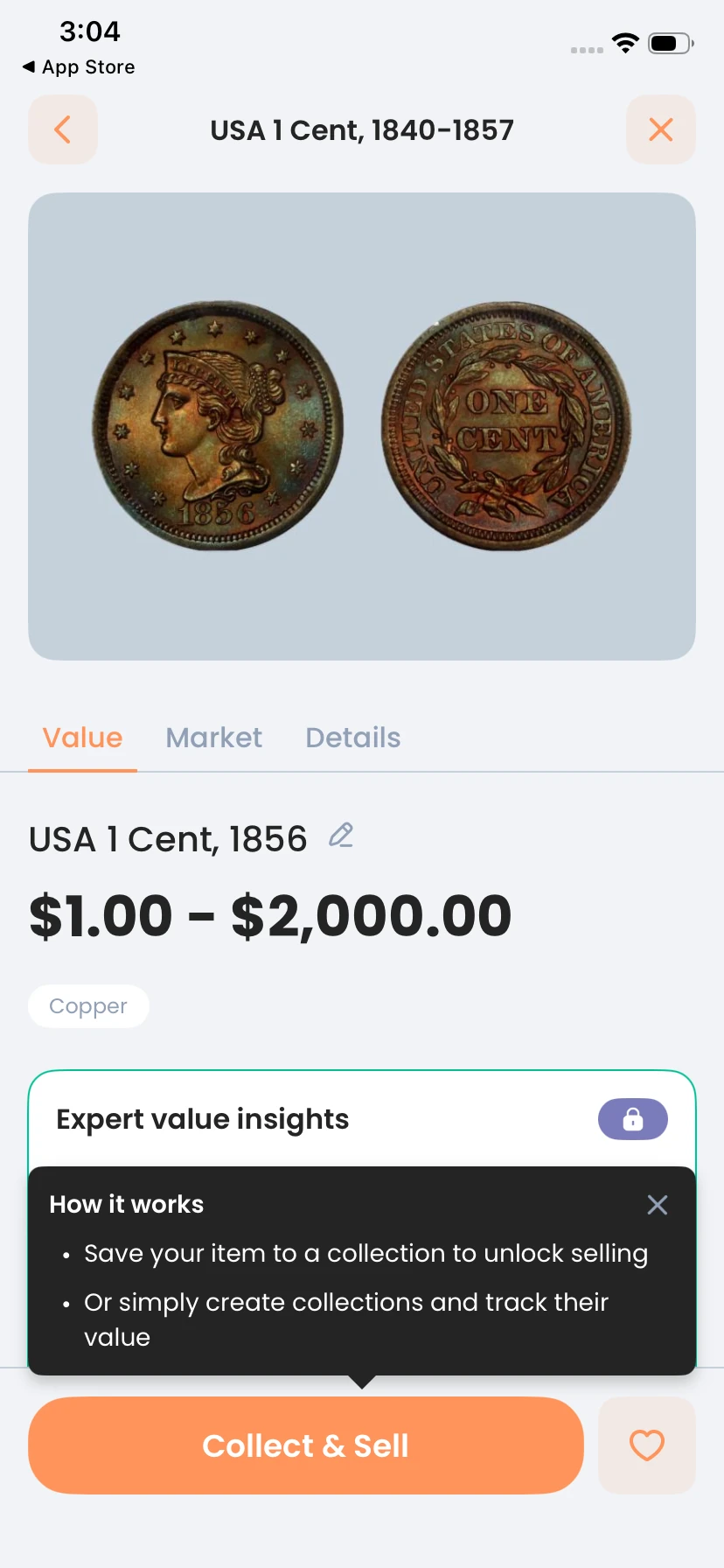
| CoinIn | The supplied result has Collect & Sell, followed by coin-information fields and saved collection records. | Bulk import was recorded as unavailable in the earlier review; it is not demonstrated by the supplied collection screens. |
HeriBase: three ways to add to your collection
- Save an identification result. Scan the coin, check its identity, then tap Collect & Sell and choose the collection option.
- Add from Collection. Open Collection and use the camera shortcut to photograph or upload another coin. Review the result and save it; + Create creates a set rather than a coin record.
- Batch import existing material. Open the import control in Collection. Choose system photos, enter an online spreadsheet URL or select a local spreadsheet file. These are the three source options inside batch import.
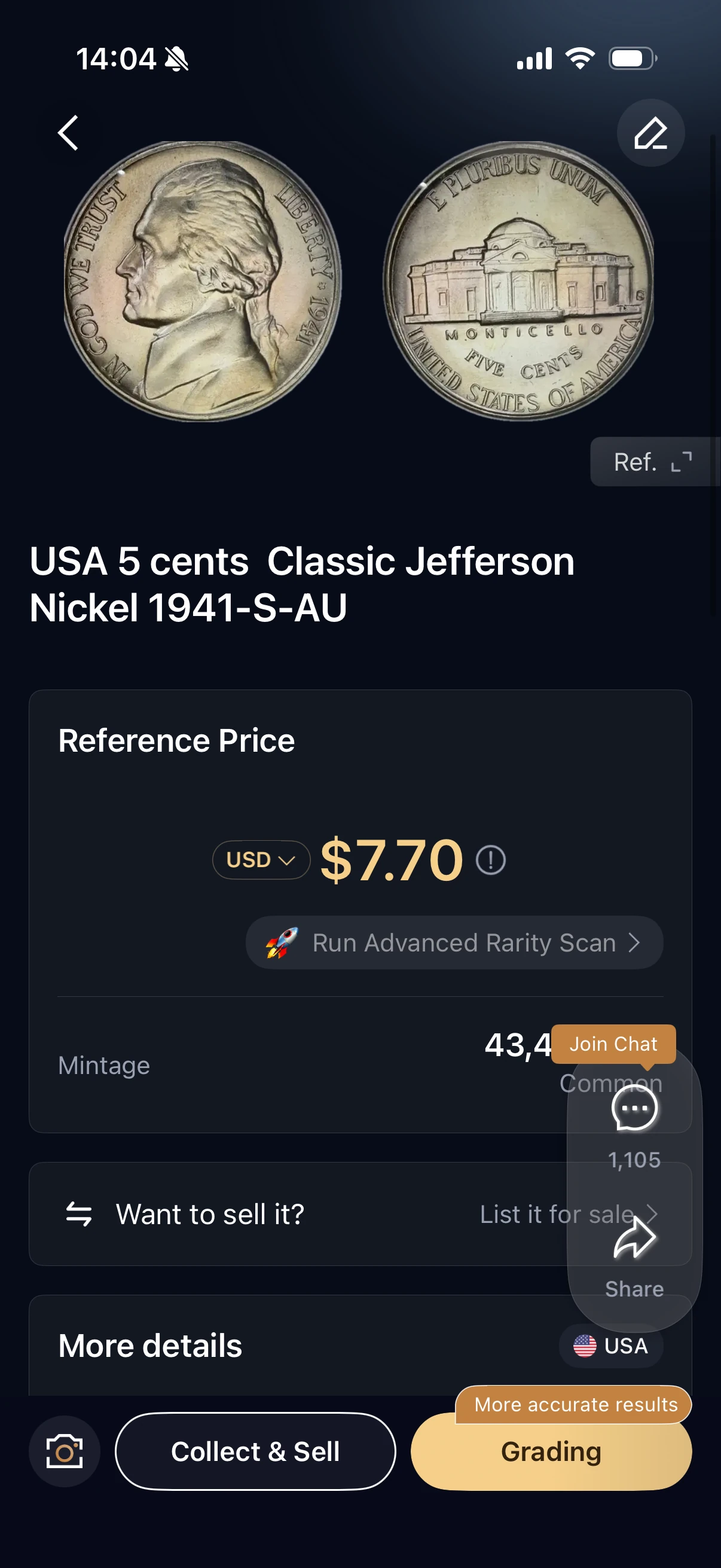
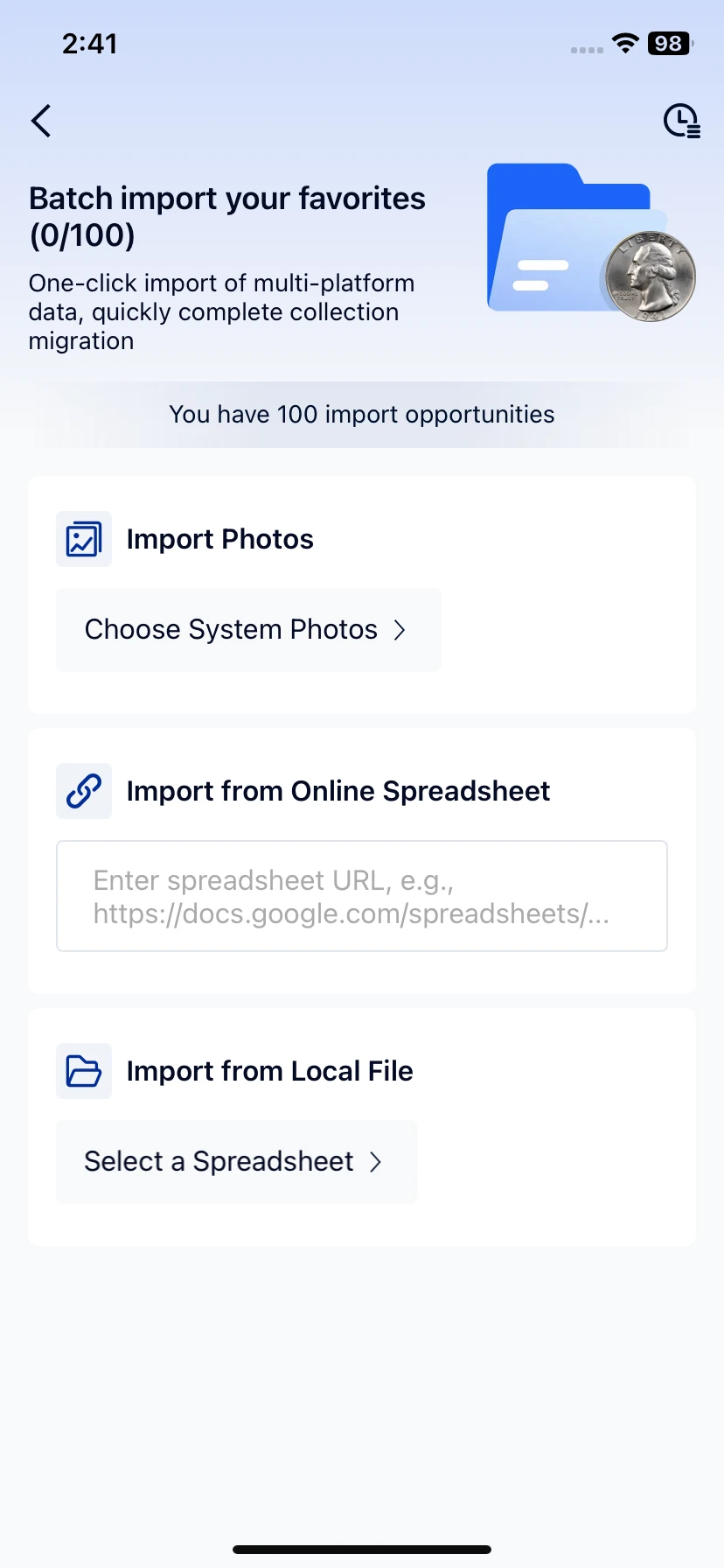
For spreadsheet import, ask support for the current import format or template and try a few records before preparing a large inventory. The source-selection screen does not establish supported columns or successful import results.
CoinSnap and CoinIn: save after identification
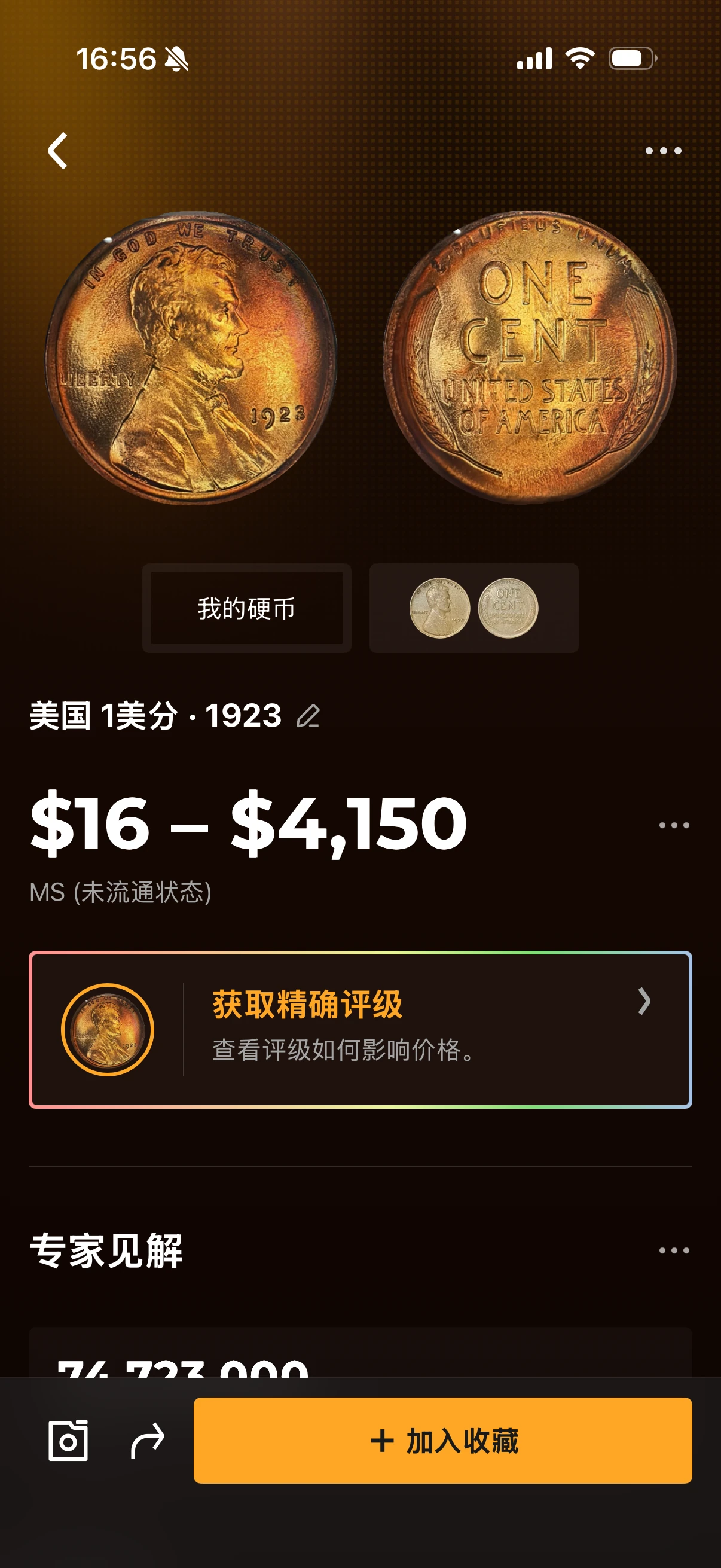
CoinSnap: after reviewing the identification result, use the Add to collection button at the bottom of the screen (加入收藏 in the supplied Chinese interface). This screenshot documents the saving entry point; it does not demonstrate batch import. CoinIn: Collect & Sell leads into the documented coin-information and collection flow, illustrated below.
Compare the Collection Overview and Value
Start with what each app shows when you open your collection. These screenshots contain different coins and account states. Compare the information provided, not the amounts.
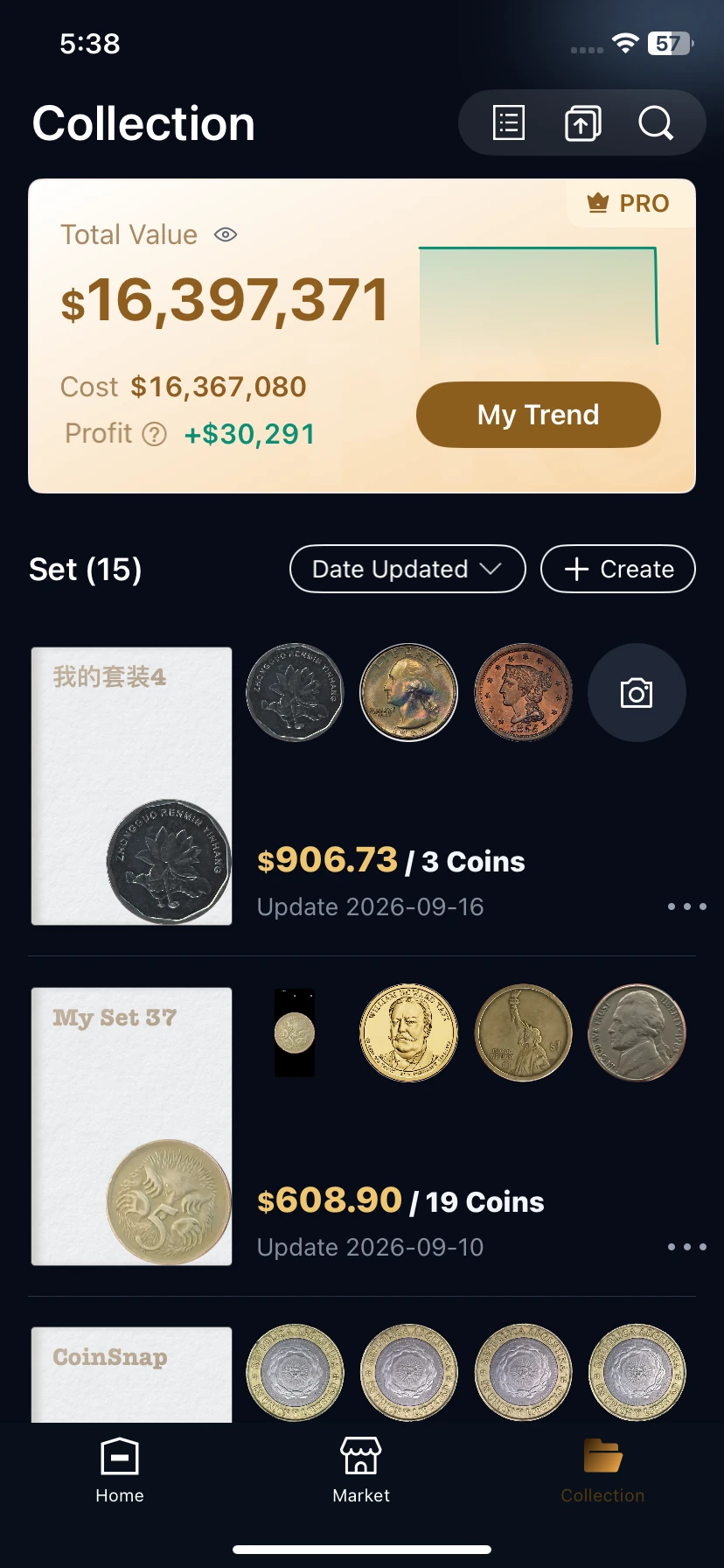
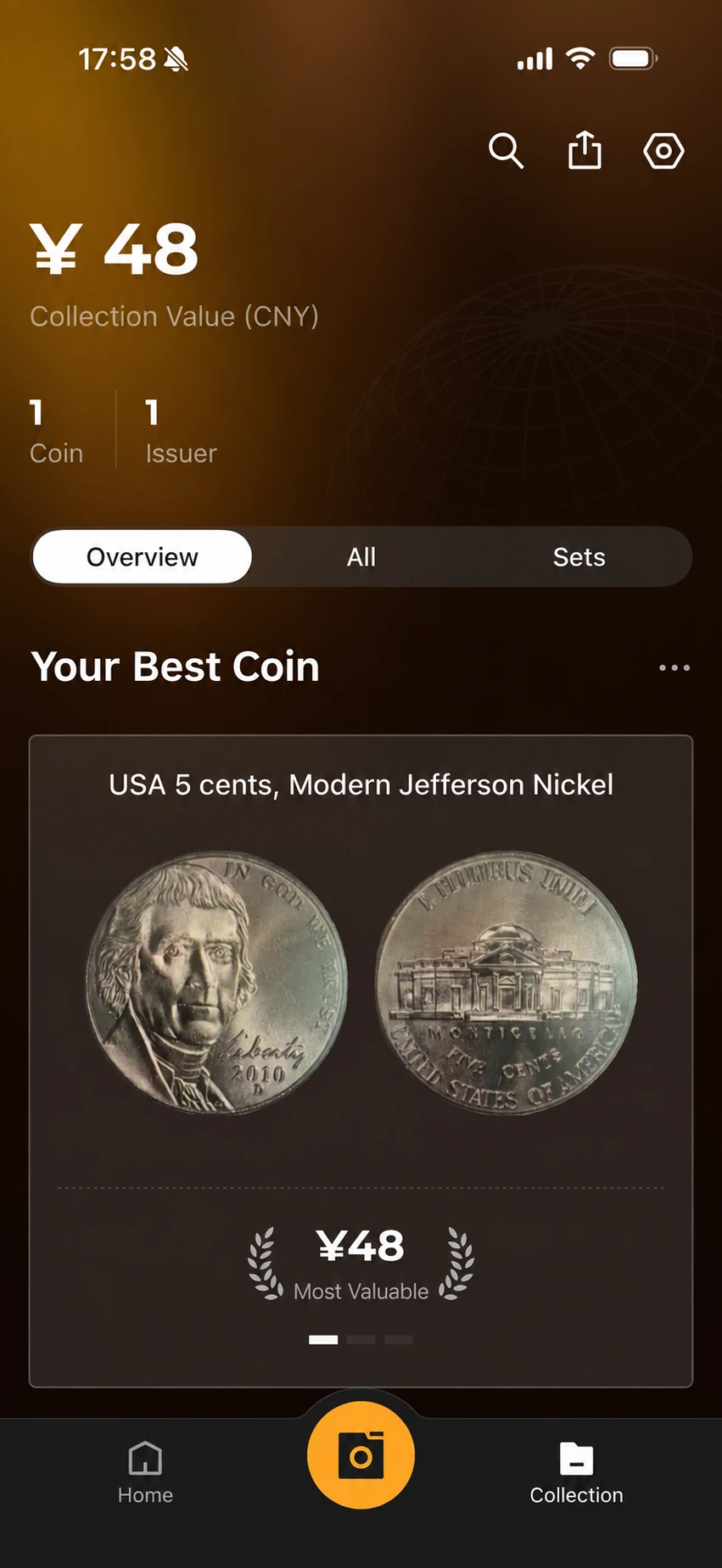
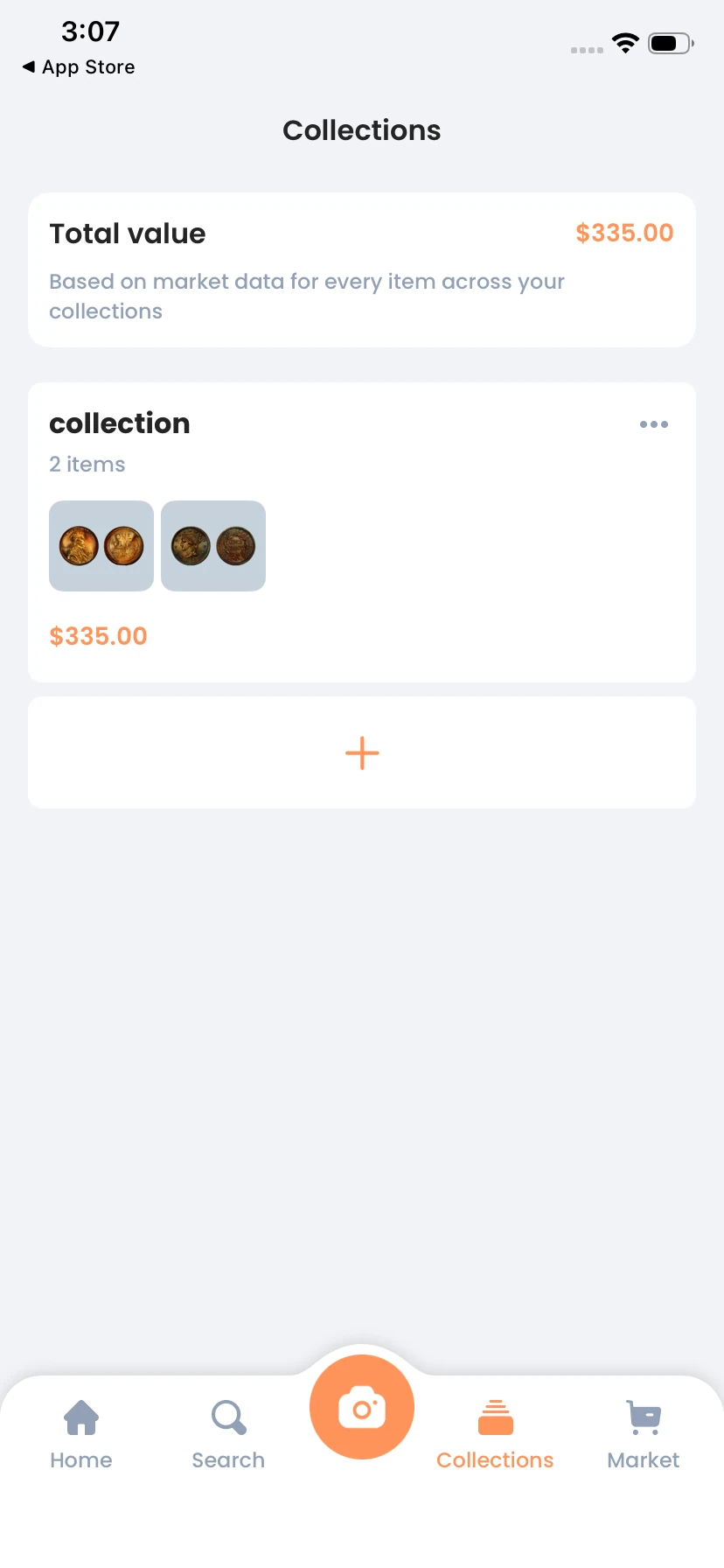
| App | Visible in the supplied screen | What remains unverified |
|---|---|---|
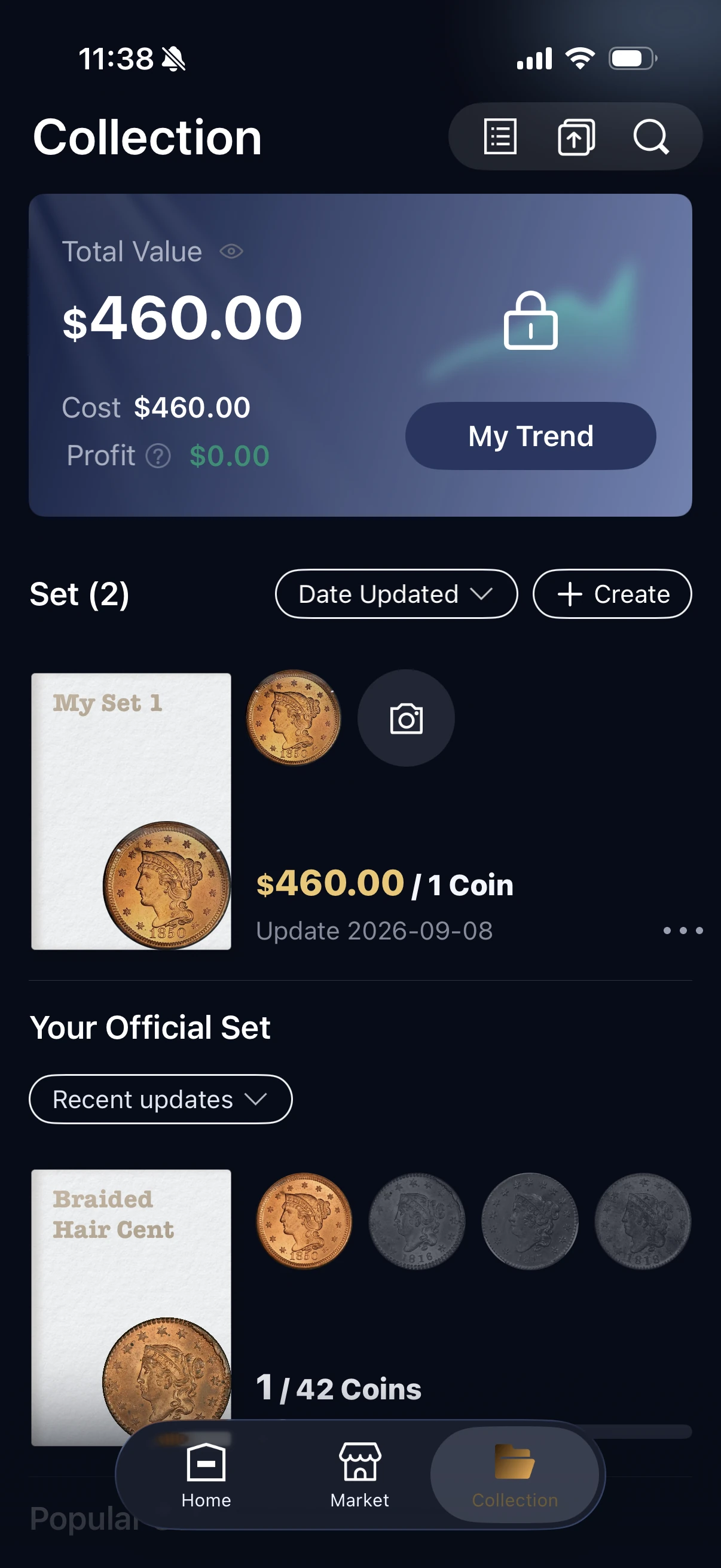
| HeriBase | Total Value, Cost, Profit, My Trend and individual sets. | Calculation accuracy and the historical data behind My Trend. |
| CoinSnap | A CNY 48 total, one coin, one issuer and collection tabs. | Historical trends and how the total is calculated. |
| CoinIn | A $335 total and a collection containing two items. | The valuation formula, purchase-cost treatment and historical trends. |
CoinIn also displays Collections $335 beside Listings $0 on its Home screen. A separate one-item view shows $200 for an 1856 cent, although that coin's result page displays a $1–$2,000 range. The supplied screens do not explain how the collection amount was selected. Those additional views are retained in the source records rather than repeated here.
A current total and a historical chart are different features. The CoinSnap overview demonstrates a total even though the earlier review used a broad “no value tracking” label. For HeriBase, the earlier review recorded a separate $29.99/year historical-value offer; confirm current access rather than assuming the My Trend button includes every feature.
Separate purchase cost, estimated value and sale proceeds
A coin that costs $20 plus $5 in acquisition expenses has a $25 recorded cost. A later $30 estimate is $5 higher, but it is not a sale. If it sells for $28 with $4 in selling expenses, the $24 received is $1 below that cost. This is an illustrative bookkeeping example, not a price forecast.
Check how your app handles unknown costs, missing estimates, quantities and different currencies. Neither a label such as Profit nor CoinIn's “potential earnings” heading establishes realized income.
What Can You Record and Edit After Saving a Coin?
After saving a coin, you may want to correct its identity, add what you paid or update your notes. Compare both the fields available for your record and whether you can return to change them later.
| App | Fields you can record | Can you edit after saving? |
|---|---|---|
| HeriBase | Name and issue details, grade, cost, custom set, photos, rim view, remarks and acquisition date. | Yes. Open the saved coin’s menu, choose Edit, change the details and select Update Collection. |
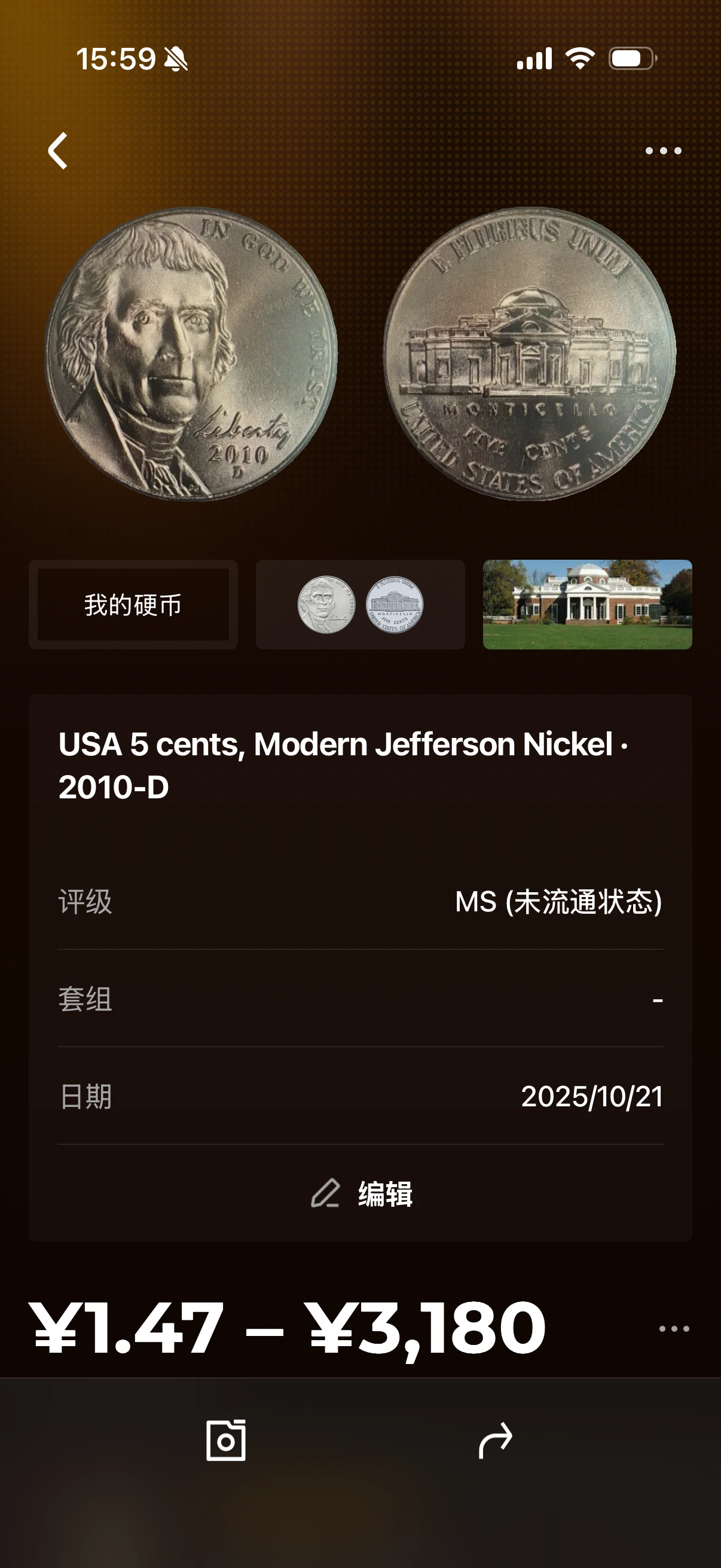
| CoinSnap | The saved detail shows coin identity, photographs, grade, set and a date. | An Edit entry is visible on the saved detail and item menu. The editable fields and a saved update are not shown. |
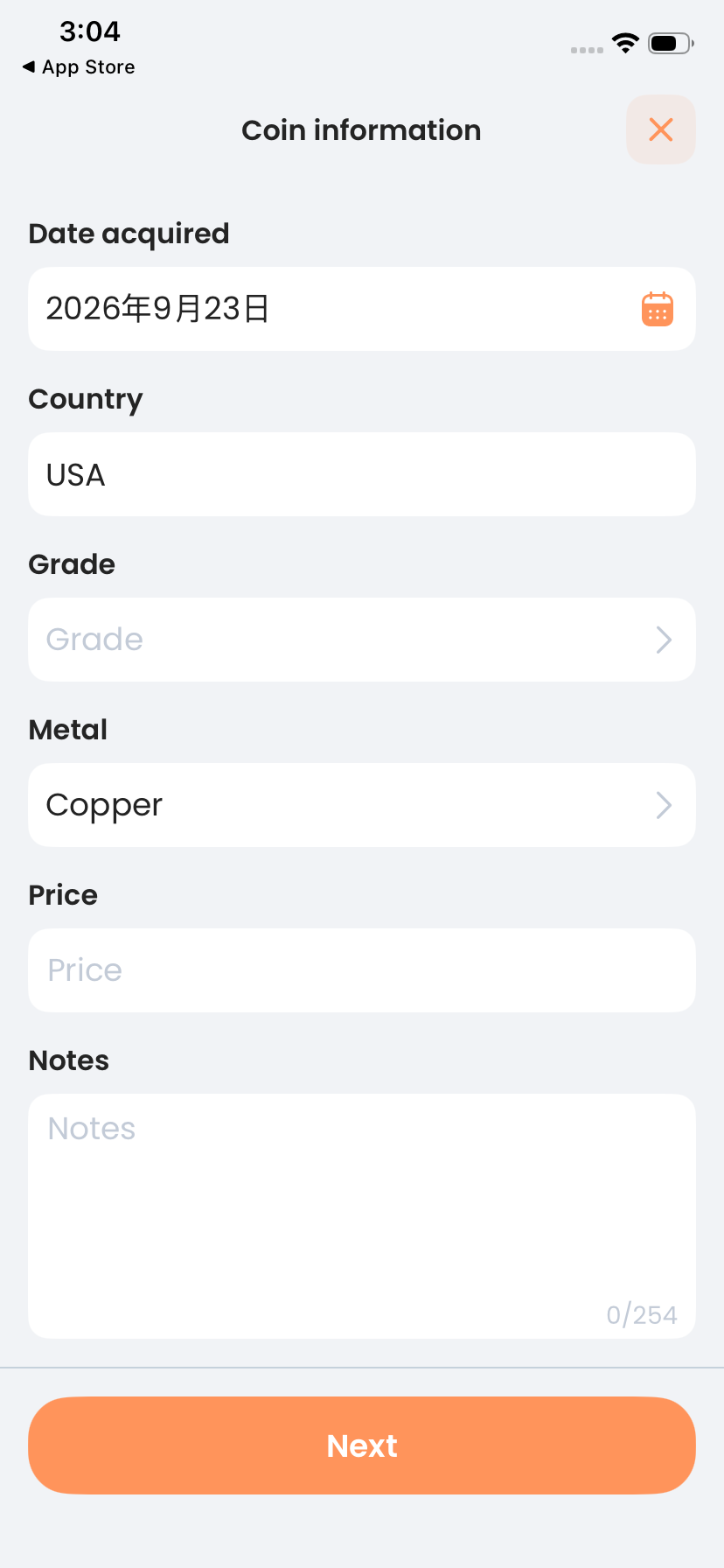
| CoinIn | Title, year, acquisition date, country, grade, metal, Price and Notes are available in the entry form. | Field editing after saving is not yet confirmed. The saved-item menu shows Change collection and Delete. |
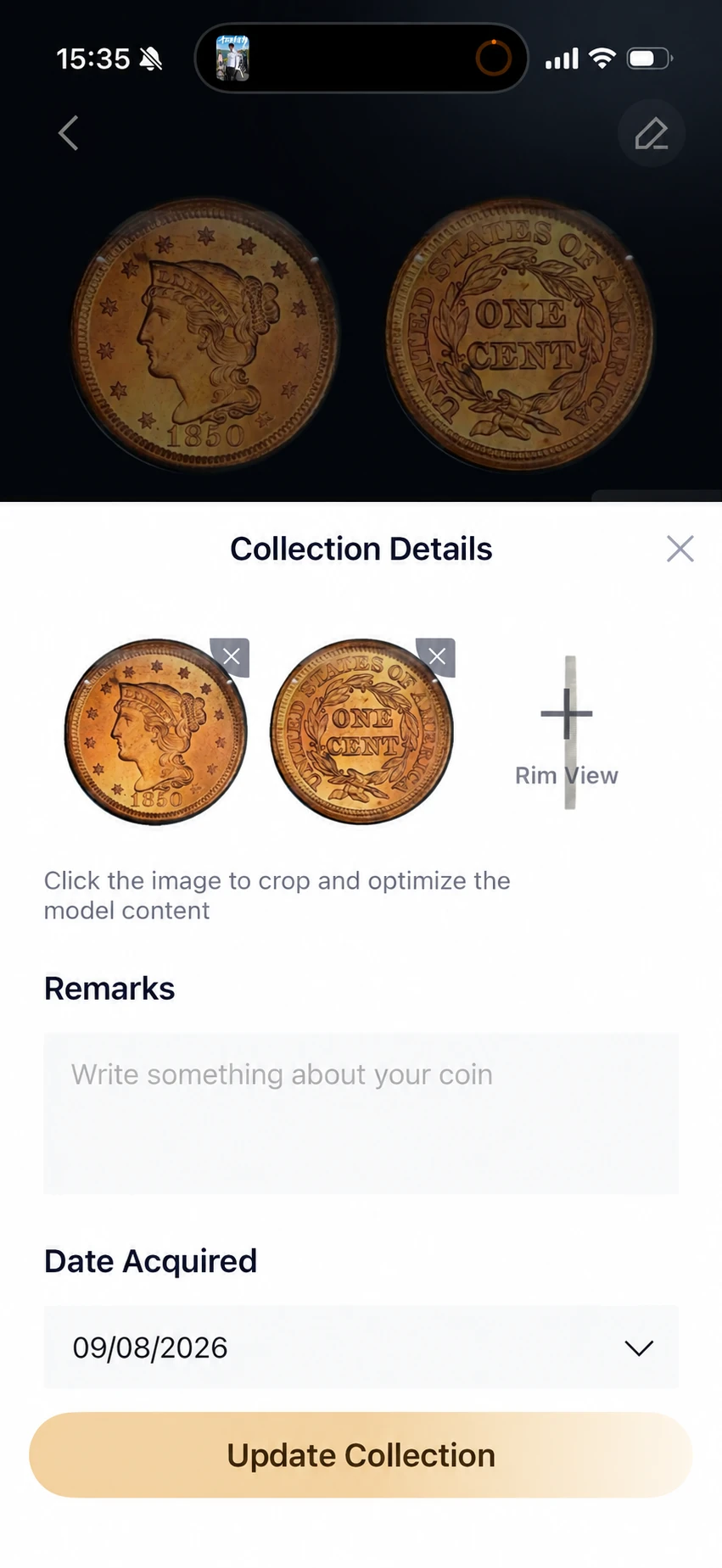
HeriBase: use Edit on an existing saved record, then Update Collection to save your changes. The collection guide shows the full editor. The image below the table illustrates its photo, remarks and acquisition-date fields.
CoinSnap: the new saved-record screenshot confirms an Edit entry. Its item menu also shows Edit and Delete. The detail displays grade, set and date, but the opened editor is not supplied, so we cannot yet say which individual fields can be changed. The label Date alone does not establish an acquisition date.
CoinIn: the supplied form demonstrates information entry before continuing with Next. It does not establish that all those fields can be reopened and edited after saving. Change collection changes the grouping; it is not evidence of editing the coin’s year, grade, price or notes. Price is the displayed field label, and its meaning as an acquisition cost has not been confirmed.
Keep a record that identifies your specimen
Give two similar coins separate photographs and personal references. Keep an unknown acquisition cost recognizable as unknown. Record a certification number when applicable without treating an app's suggested grade as a grading-service certificate.
MyCoinage's collection guide usefully emphasizes acquisition history. Save the seller, date, lot or receipt reference and original currency while that information is available. For example, use the specimen reference “LC-014” in the record and its photo and receipt filenames. If your app lacks a dedicated field, a consistent note and a separately stored receipt can preserve the connection.
Create Sets, Choose Covers and Manage Saved Coins
Use personal sets to group coins by trip, country, purchase or collecting project. The overview below compares the controls; each app’s explanation and screenshots then stay together.
| App | Create and name | Cover | Organize and remove |
|---|---|---|---|
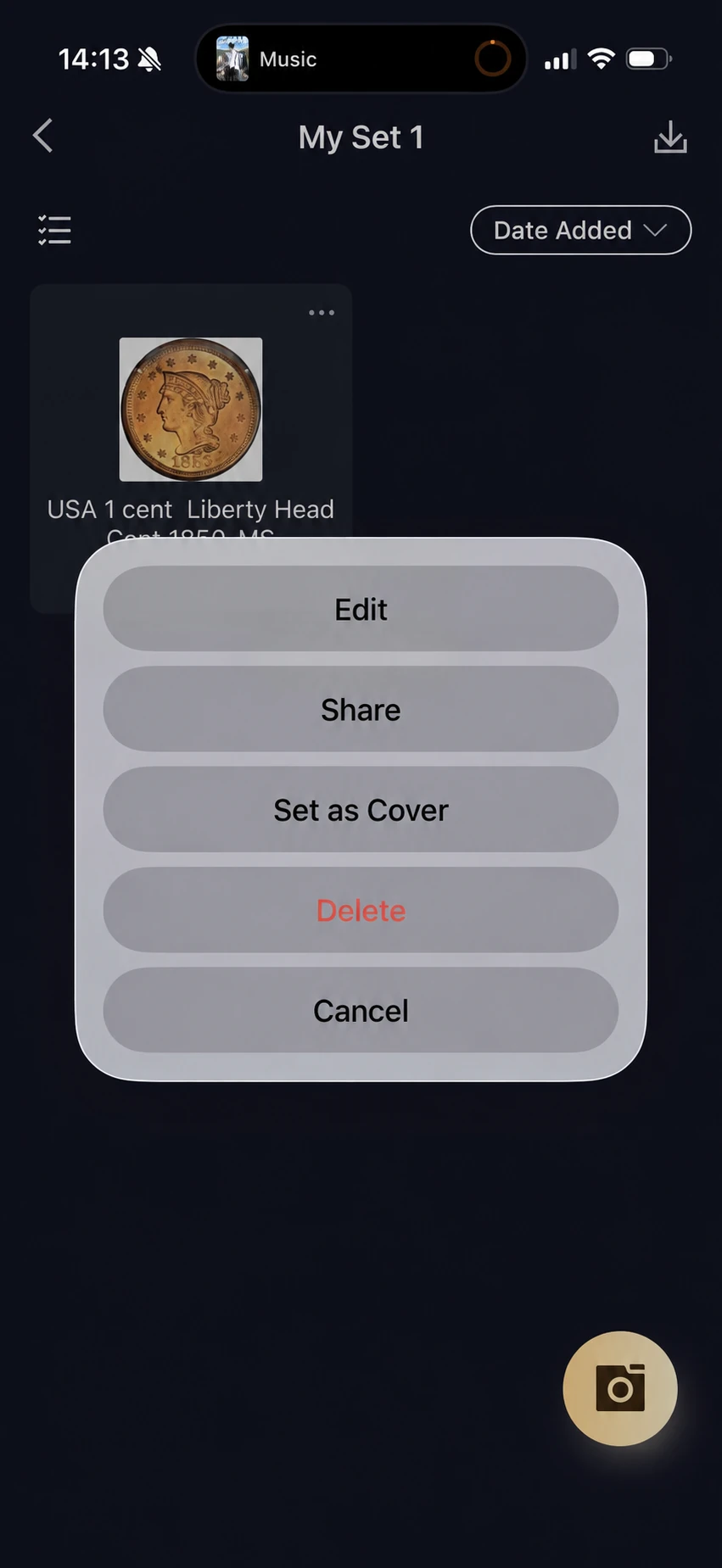
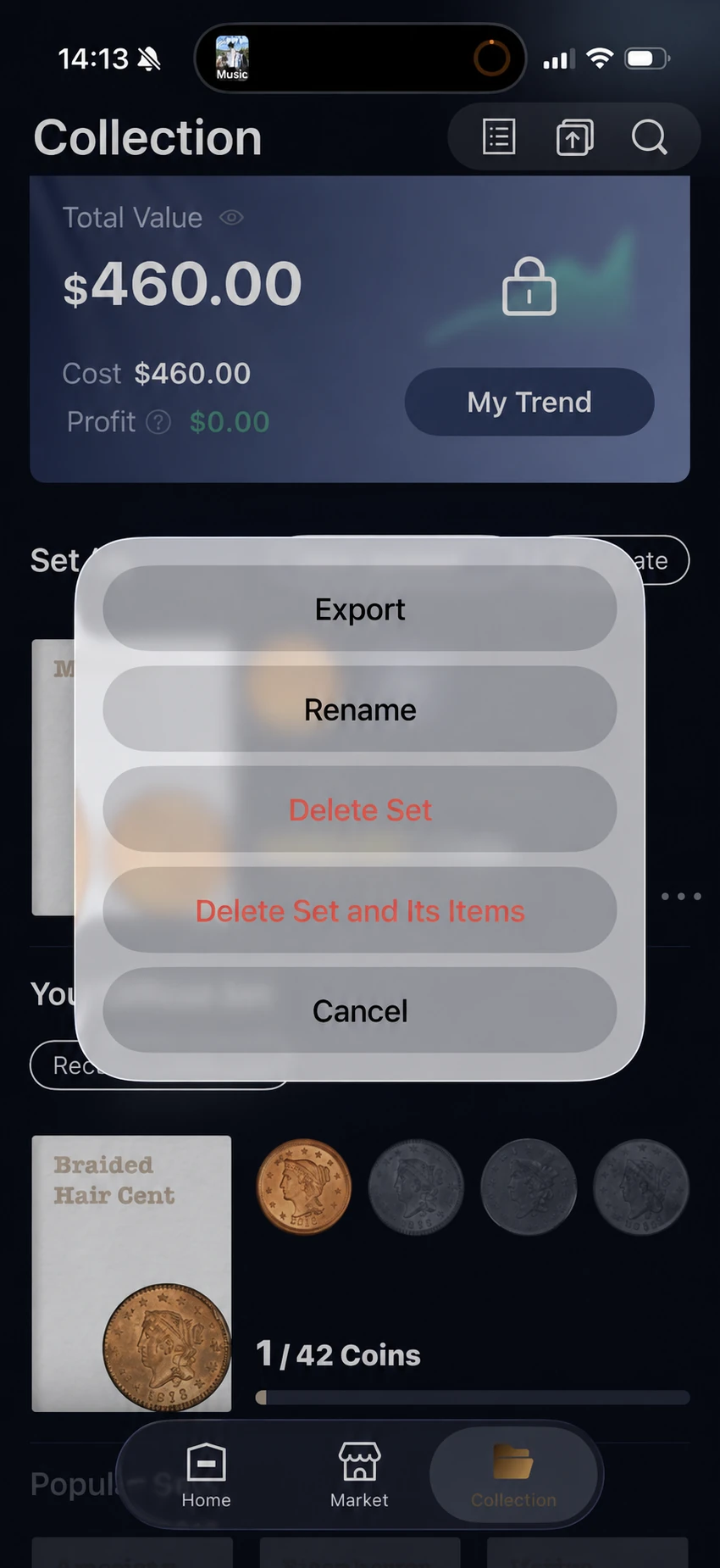
| HeriBase | + Create and Rename | Set as Cover from a saved coin | Custom Set assignment; separate coin and set deletion options |
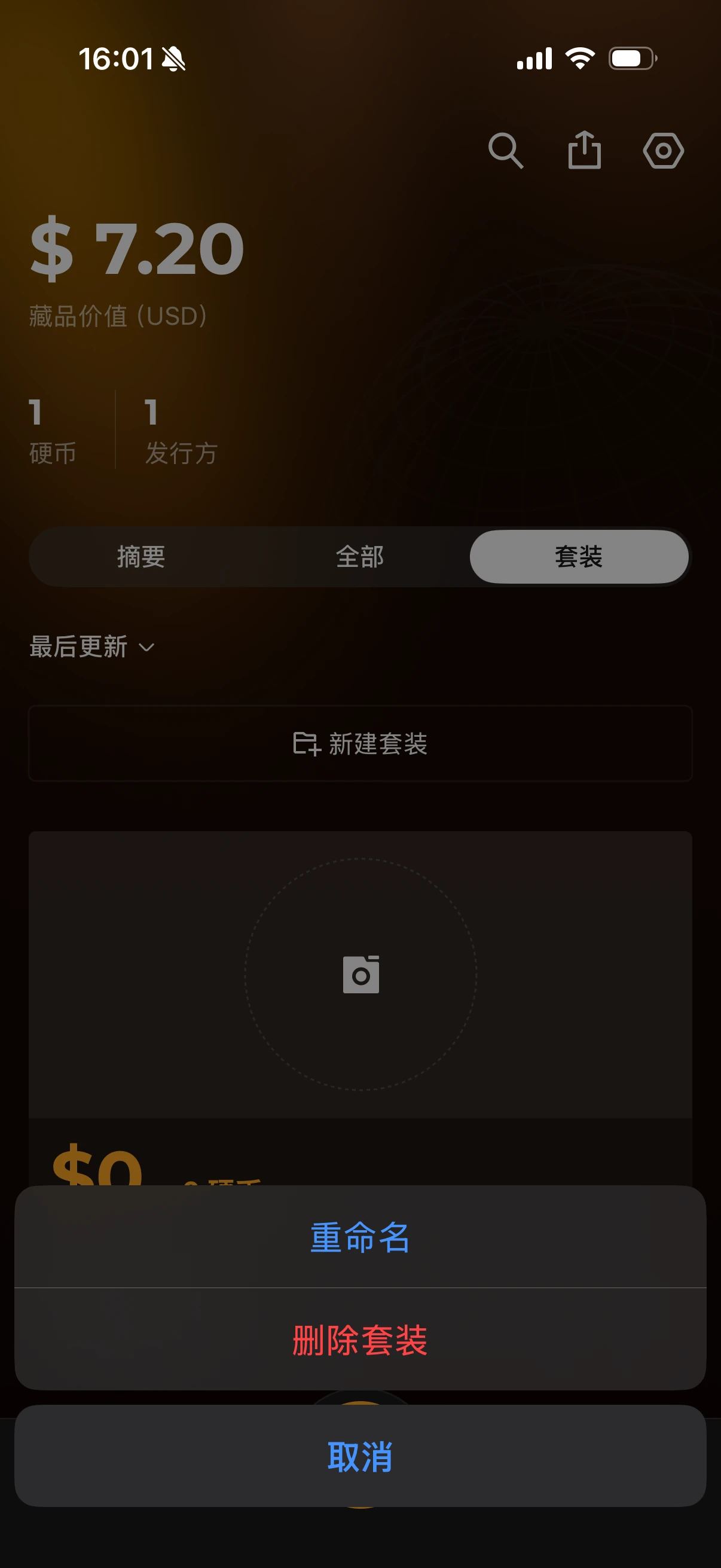
| CoinSnap | New set form and Rename | Custom-cover control not shown | Coin Delete and Delete set; Filter and Sort controls |
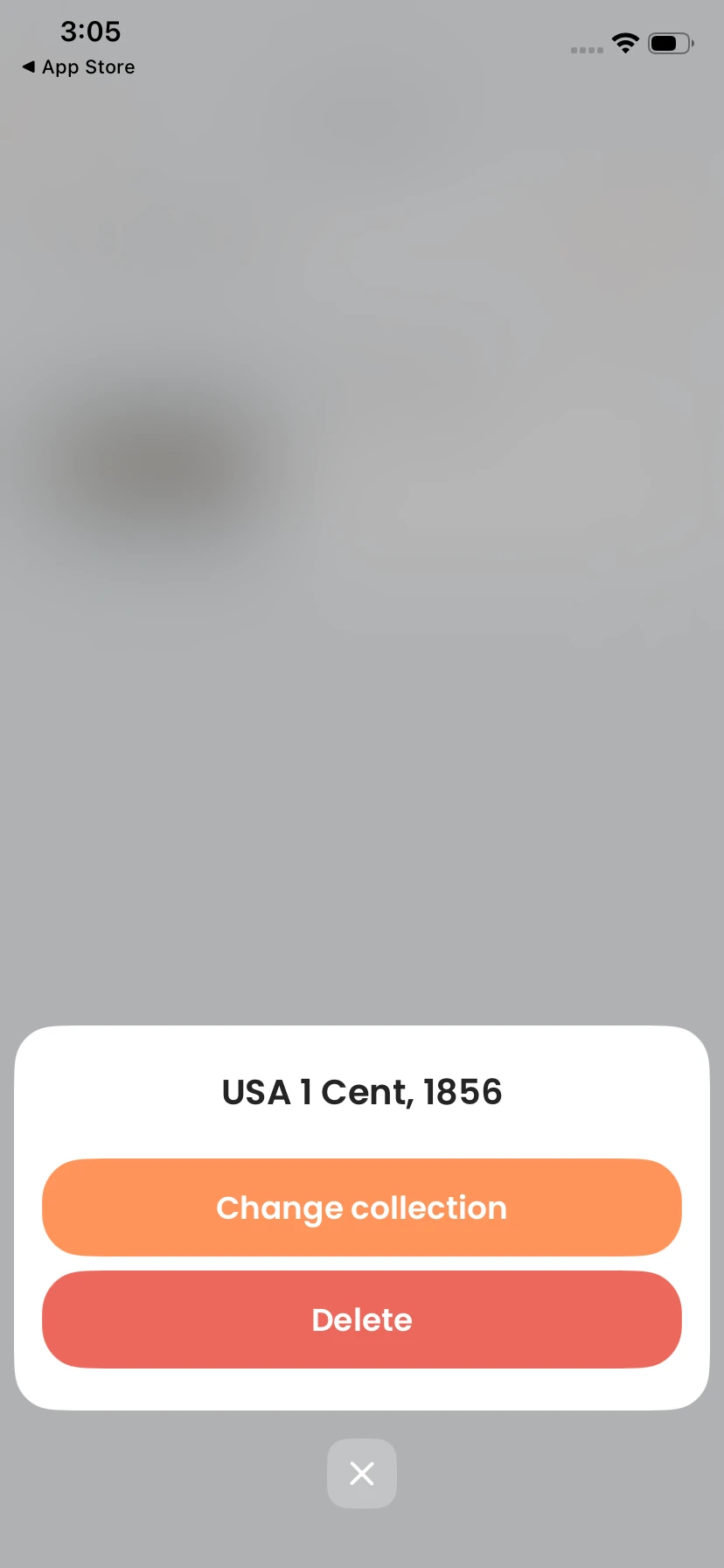
| CoinIn | Named collection and add control shown | Custom-cover control not shown | Change collection and Delete on a saved coin |
HeriBase: create a set, choose its cover and manage its coins
- Create and rename: open Collection, use + Create to start a personal set, and choose Rename from the set menu.
- Cover and photographs: choose Set as Cover from a saved coin’s menu. The record editor separately offers coin photos, a rim view and cropping; this does not establish arbitrary cover-image upload.
- Move and delete: assign a record through Custom Set in its editor. Delete removes a selected coin; the set menu distinguishes Delete Set from Delete Set and Its Items.
- Find and sort: the saved-item list shows Date Added ordering and a selection control. Searching personal notes or purchase fields is not established.
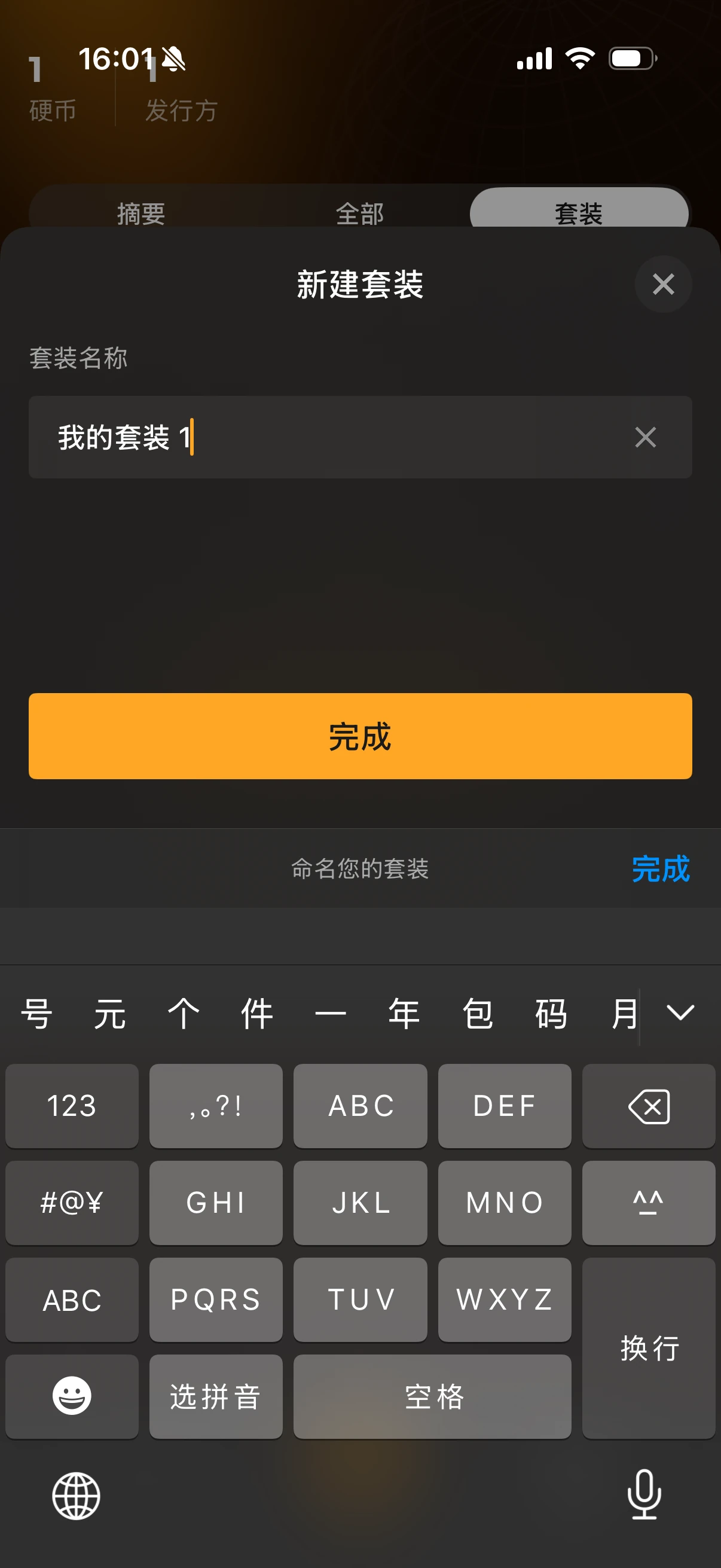
CoinSnap: name a set and manage it from the set menu
- Create and rename: enter a name in New set and use Done. The set menu offers Rename.
- Cover: the supplied screens do not demonstrate a custom-cover upload control.
- Move and delete: Delete appears on a saved coin and Delete set on a group. The saved detail has a Set field, but a move destination and the effect of deleting a set on its coins are not shown.
- Find and sort: All includes Filter and Sort, with a search control at the top. Searchable fields and completed search results have not been tested here.
CoinIn: change the collection assigned to a saved coin
- Create and name: the overview shows a named collection and an add control. A creation or rename form is not supplied.
- Cover: saved coin thumbnails are visible; a custom-cover control is not shown.
- Move and delete: the saved-item menu offers Change collection and Delete. The destination picker and completed actions are not supplied.
- Find: saved coins appear inside their collection. Collection-specific search and sorting are not demonstrated.
Before deleting a group, check whether the confirmation removes only the group or also its coins. The screenshots document available controls; they do not establish every completed action or its effect.
Official Sets and Coin Catalogs: Can You Follow a Series?
App-provided sets and catalogs help you browse a predefined series. A personal folder helps organize coins you own. To collect a complete series, you also need to know whether the app distinguishes owned coins, missing issues and duplicates.
| App | Catalog or predefined sets | What the evidence establishes |
|---|---|---|
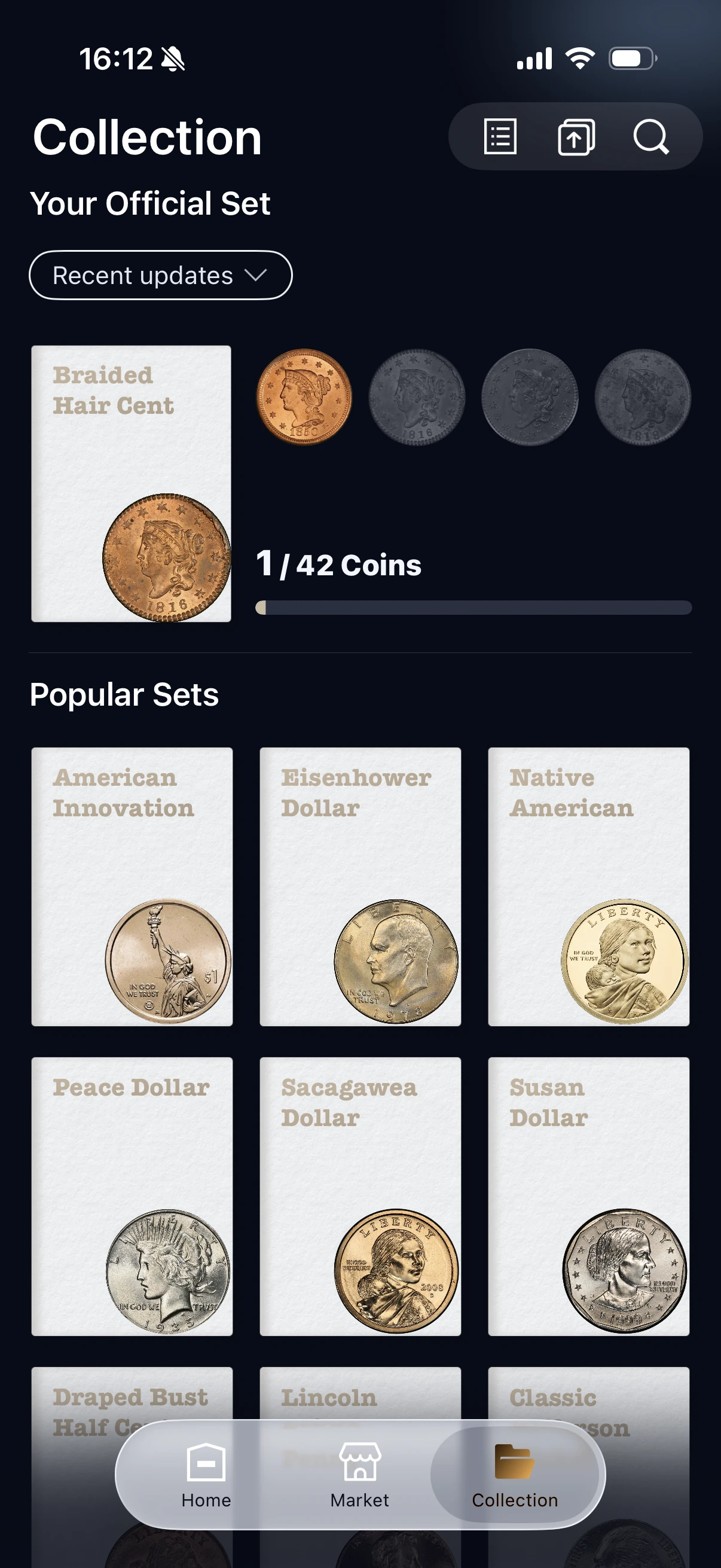
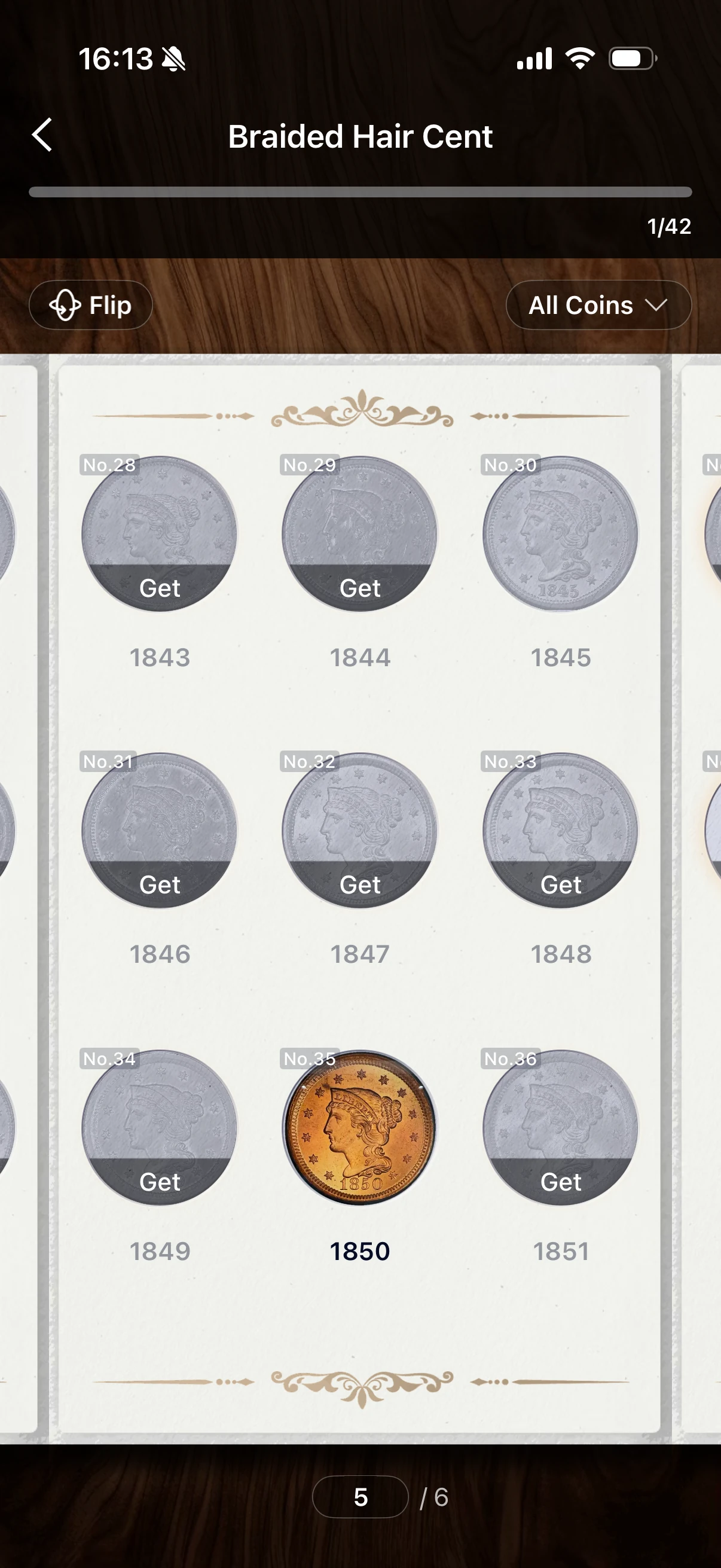
| HeriBase | Official-set library, progress count and a paged coin album. | The displayed Braided Hair Cent set shows 1/42. Its album highlights the 1850 coin among gray positions and includes Flip and All Coins controls. |
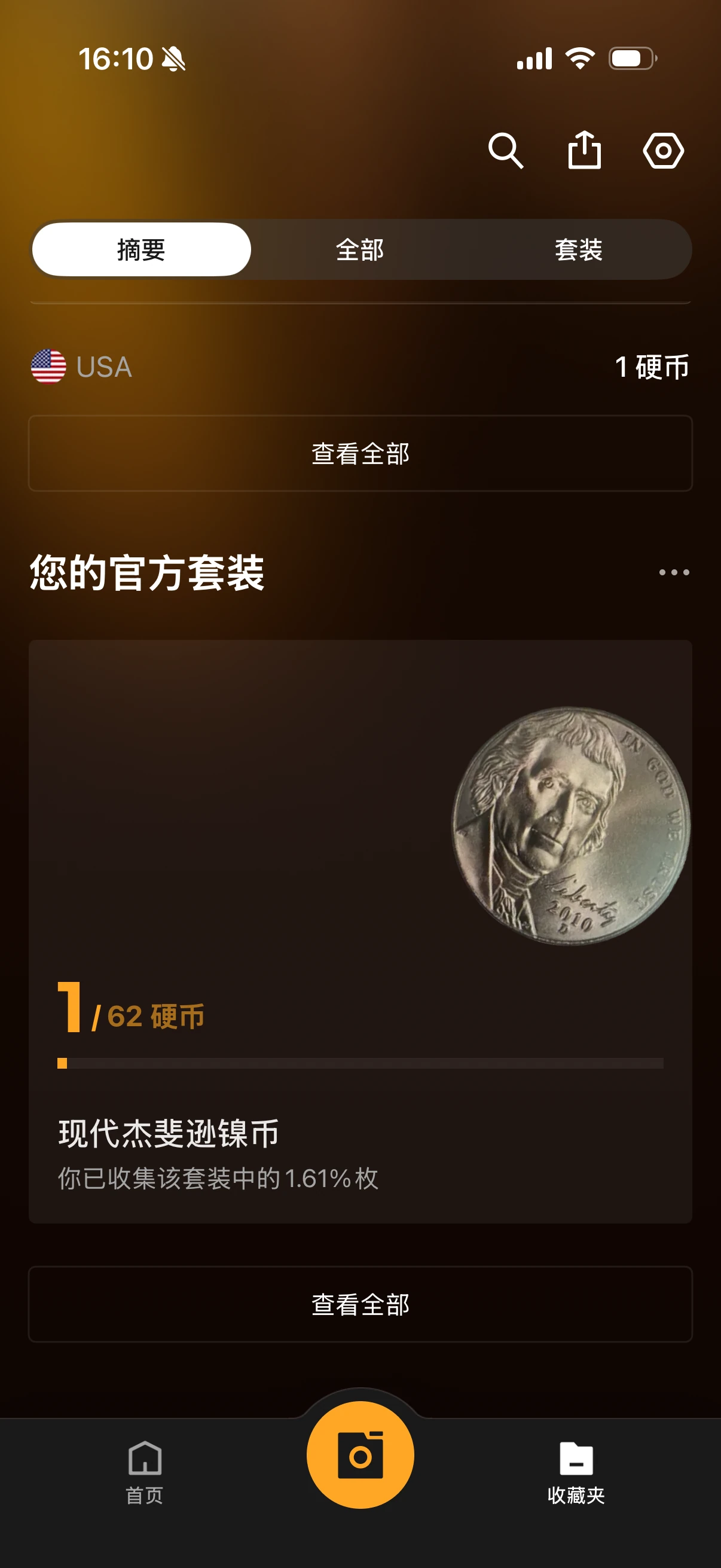
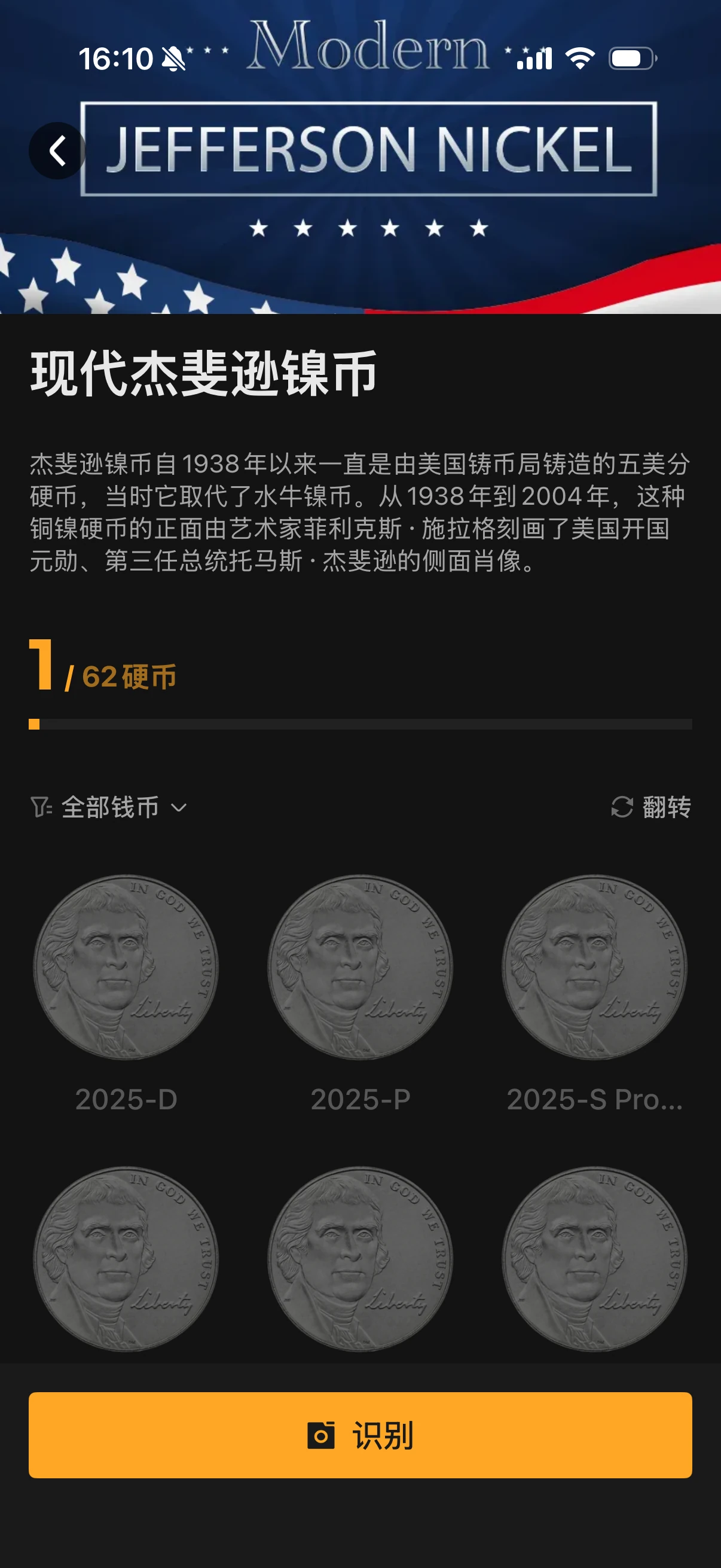
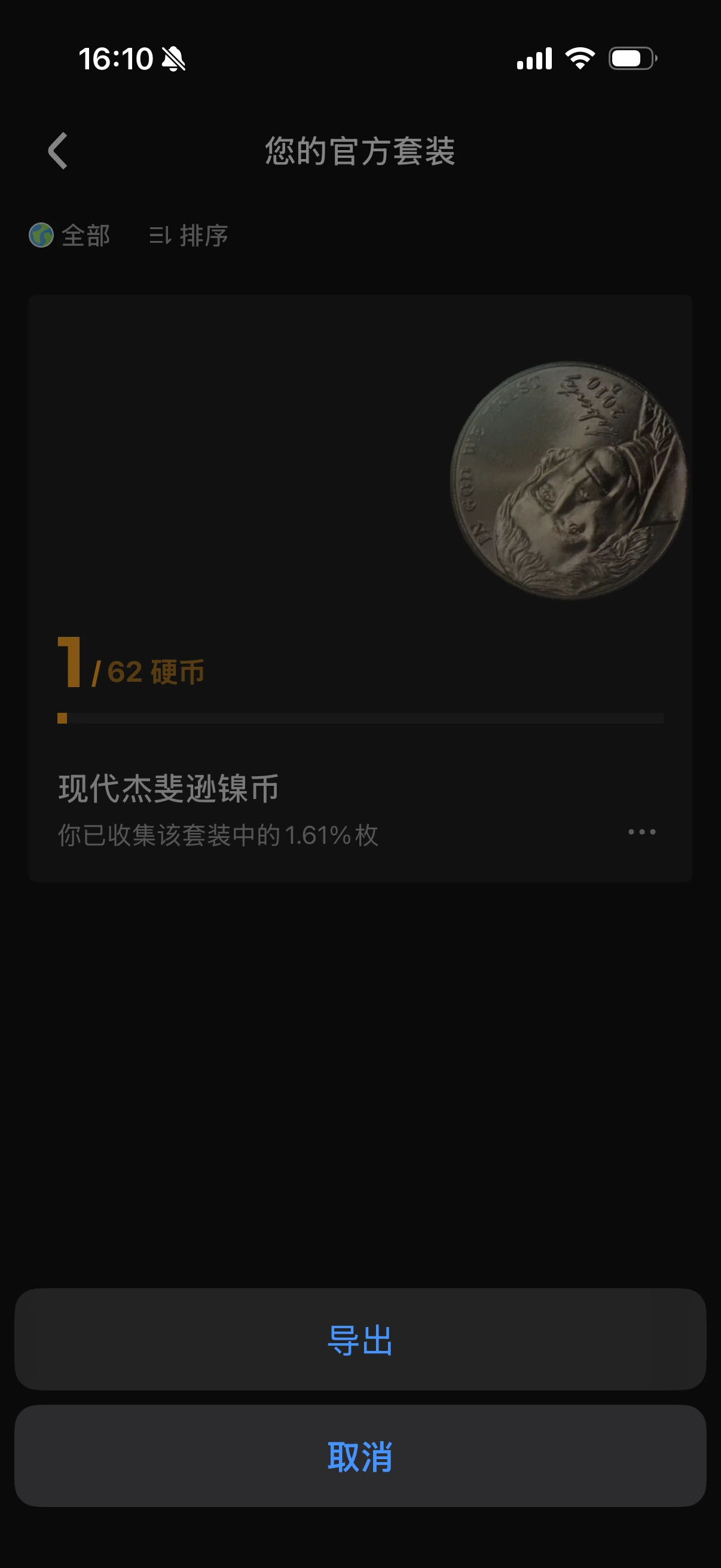
| CoinSnap | Official sets with a collected count, completion percentage and a date-and-mint catalog. | The Modern Jefferson Nickel example displays 1 of 62 coins and 1.61% completion. A separate menu offers Export. |
| CoinIn | No official-set feature in the use reported for this comparison. | The contributor confirmed that CoinIn has no official-set content in their tested experience. Personal collections remain available. |
Compare official-set overviews
HeriBase presents Your Official Set and a library of Popular Sets as album covers. The supplied example is labeled Braided Hair Cent and shows 1/42 Coins. CoinSnap presents Your official sets as cards; its Modern Jefferson Nickel example shows 1/62 coins and 1.61% collected. Both therefore demonstrate progress within app-provided sets, beyond naming a personal folder. For CoinIn, the contributor reports no official-set content in the version they used; it remains an option for personal collections.
Compare the album and the series directory
HeriBase uses a book-style album. In the supplied page, the 1850 coin appears in color among gray date positions, with Get controls on several positions. The top shows 1/42, Flip and All Coins; the bottom shows page 5 of 6. Its album cover is retained as a supporting image rather than repeated below. CoinSnap uses a series page with a progress bar and year-and-mint entries such as 2025-D and 2025-P, plus All coins, Flip and Identify controls.
For an album-like presentation, HeriBase is worth trying; for a directory with a visible completion percentage, CoinSnap is worth trying. These are interface differences, not evidence that one catalog is more complete. The displayed denominators describe different sets and should not be compared as measures of app quality.
CoinSnap’s official-set menu offers Export; a delivered file and its scope remain unchecked. For both apps, the screenshots do not establish duplicate handling, the options inside All Coins or a completed progress update after adding another specimen. The series labels and date coverage shown in the apps are not independently validated numismatic classifications.
Here, official refers to app-provided sets; it does not imply mint endorsement or third-party certification. Before choosing an app for a date-and-mint series, open the relevant set and check its coverage, missing slots and treatment of duplicate specimens. Keep any mint-issued packaging or certificate information with your own records.
CoinMap’s comparison with Maktun usefully distinguishes collecting progress from inventory management. A country or trip folder may be enough for souvenirs; a series collector needs more than a named folder and a total value.
Exporting and Keeping a Copy of Your Collection
Import matters when you already have photographs or a spreadsheet. Export matters when you want a copy outside the app or plan to switch tools. The scope of the function is as important as whether an export button exists.
| App | Bulk import recorded | Export recorded | Recorded export scope |
|---|---|---|---|
| HeriBase | Yes | Yes | Individual sets |
| CoinSnap | Not available in earlier review | Yes | All coins or individual sets |
| CoinIn | Not available in earlier review | Not available in earlier review | — |
These are the earlier review's observations. A function recorded as unavailable then may change in a later release; an untested function should not be labeled absent. The table also does not establish which fields or images arrive in the exported file.
Compare the export controls
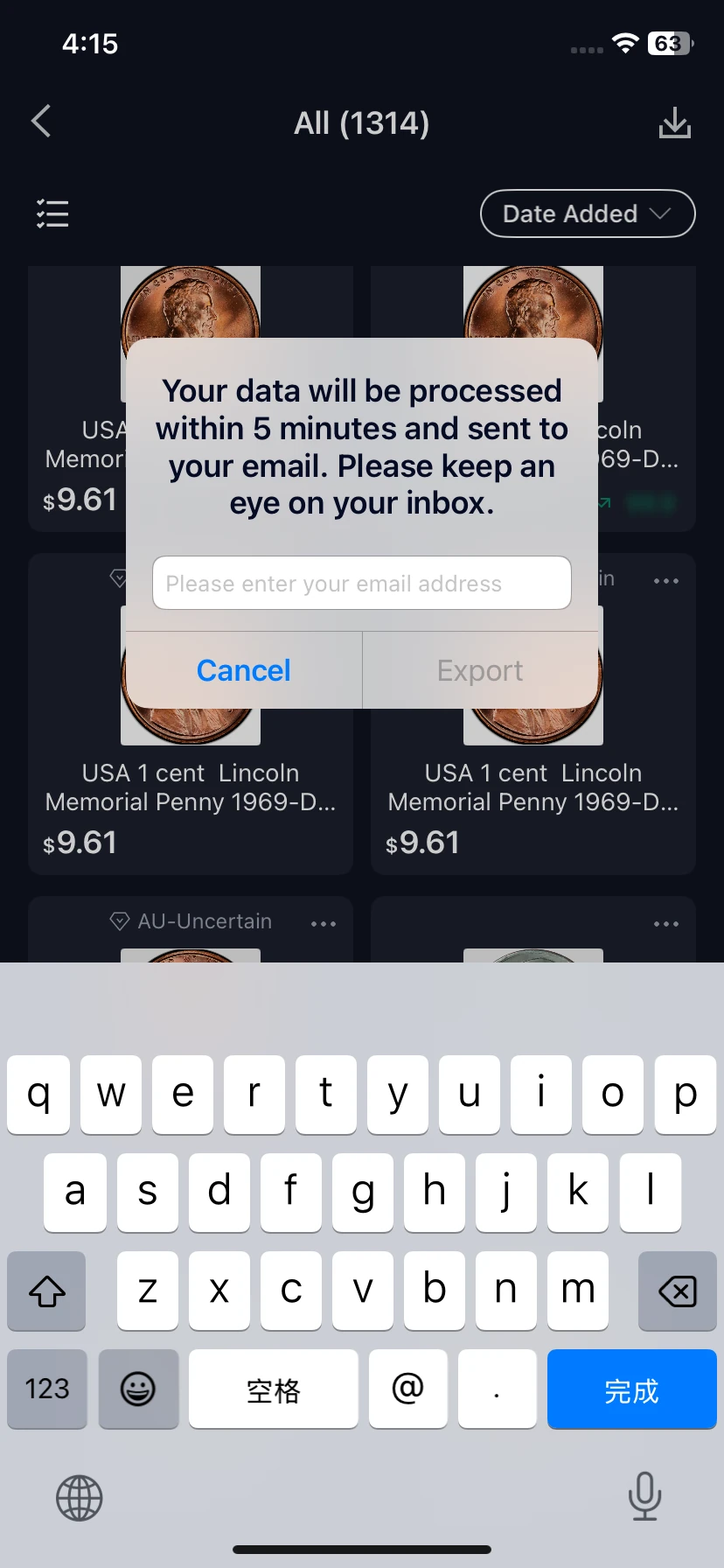
HeriBase: Open the collection list, select the download control, enter the receiving email address and choose Export. The displayed prompt gives a five-minute processing message; it is not a measured delivery guarantee. The screenshot demonstrates the request, not a successfully received file.
CoinSnap: The earlier review records whole-collection and individual-set exports. The previously supplied screenshot above shows Export in an official set’s action menu. It documents the entry point; a delivered sample file is still needed to compare exported fields and photographs with HeriBase.
CoinIn: the earlier review recorded no import or export. The new collection screenshots do not confirm either function, so this remains a historical observation to recheck.
Make the export understandable outside the app
The CoinCollectionApp comparison gives particular attention to per-coin photographs and documentation that can be shared. For this guide, the useful question is simple: could someone connect an exported row to the physical coin without your explanation?
Try opening the export on another device. Match a row to its photograph, specimen reference and acquisition record. Keep visible condition notes, including damage or suspected cleaning, instead of leaving only an optimistic grade. A readable summary can help explain a collection to a family member or prospective buyer; a structured file can help with editing and migration. Neither format should be assumed to include the other one's contents.
What to check in an exported file
Open the file outside the app. Compare record counts, quantities, dates, currencies, costs, notes and certificate numbers with the source records. Check whether photographs are included, linked or omitted. A spreadsheet that opens successfully may still need column mapping before another app can import it.
Keep a dated copy and your original photographs. Synchronization, export and backup are different: a synchronized deletion may affect other devices, while a usable backup should let you recover earlier information. None of those capabilities should be inferred solely from a sign-in or export control.
Collection Permissions and Recorded Subscription Prices
Start by separating free scanning from free collection storage. An identification allowance does not tell you how many records you can save, whether export is included or what remains accessible after a subscription ends.
These USD offers and scan allowances were recorded in the earlier September 2026 review, not newly checked purchase quotes. The collection limits for all three apps have not been measured on equivalent accounts. Confirm the offer for your region, platform and account before subscribing.
Collection permissions: what the evidence establishes
| App | Free saved-item capacity | Paid collection capacity | Export access |
|---|---|---|---|
| HeriBase | No numerical free limit is documented in the supplied evidence. | The supplied Pro benefits screen lists no limit to collection size. | The same screen marks spreadsheet export Annual only. |
| CoinSnap | Not established by the supplied screens or earlier review. | Not established by the supplied evidence. | Export is recorded, but its free or paid access requirement is not documented. |
| CoinIn | Not established by the supplied screens or earlier review. | Not established by the supplied evidence. | The earlier review recorded no export; these screens do not establish current availability. |
The HeriBase Pro benefits screenshot is a reused account screen, not a current offer checked across regions. Its app build was not recorded. It establishes the displayed paid benefits, not the free-account limit or access after expiration. There is not enough comparable evidence here to recommend one of these apps as the best free collection manager.
Historical scan allowances and prices
| App | Free identification recorded | Subscription recorded | Collection-specific consideration |
|---|---|---|---|
| HeriBase | 3 scans per day; ads for additional scans | $39.99/year | The supplied benefits screen marks spreadsheet export Annual only. |
| CoinSnap | 10 scans total | $39.99/year | Recorded export options do not establish free export access. |
| CoinIn | 5 scans total | $10.99 every 7 days; annual plan not confirmed | Recorded paid trading access is separate from basic collection organization. |
Before choosing a plan, check saved-item capacity, export access, historical-value access and renewal terms. The lowest purchase price is only useful if the app can retain the records you need.
What Happens When You Want to Sell or Check a Value?
The earlier comparison records marketplace functions in HeriBase and CoinIn. HeriBase allows free browsing, with a percentage-based service fee on completed transactions; CoinIn's recorded trading access requires payment. CoinSnap was recorded without an in-app marketplace.
These observations describe access, not the likelihood or speed of selling a coin. Keep an asking price separate from a completed sale, and update your own inventory when an item leaves the collection.
With HeriBase, you can scan a coin, review its identity and reference value, then save the checked record. If you disagree with the estimate, keep clear photos and comparable records and apply for human expert appraisal through the platform. Check the separate fee and service scope. A photo-based review may still require physical examination when authenticity or material cannot be resolved from images. Our coin appraisal guide explains these routes.
Which App Should You Choose for Your Collection?
For basic collecting, all three are options. HeriBase, CoinSnap and CoinIn let you keep coins in collections, and the supplied screens show collection reference values. If you mainly want to save finds, group your coins and revisit an estimated total, start with the app whose workflow you find easiest. The more useful differences appear when you need detailed records, existing-data import or an export you can keep elsewhere.
For a simple collection and reference values: consider all three
For a small group of circulation finds or travel souvenirs, HeriBase, CoinSnap and CoinIn are all reasonable starting points. Try saving a few coins, opening their collection and finding them again. Compare the saved-item allowance and subscription terms separately from free scanning. A displayed collection amount is a reference estimate, not a guaranteed selling price; a larger number does not make an app a better choice.
For existing photos or spreadsheet records: start with HeriBase
HeriBase supports both import and export in the documented workflow. Its import screen offers photos, an online spreadsheet and a local spreadsheet, while collection export is requested by email. This makes it worth starting with when your inventory already exists outside the app. Confirm the import template, try a small batch and inspect the export before moving the whole collection. The supplied benefits screen marks spreadsheet export Annual only.
For an external copy of your collection: compare HeriBase and CoinSnap
HeriBase and CoinSnap both have recorded export options. The earlier comparison records individual-set exports for HeriBase and either all coins or individual sets for CoinSnap. If exporting your entire collection together is your priority, CoinSnap's recorded scope is worth checking first. If you also need to bring existing records into the app, HeriBase's import options are relevant. In either case, check which fields and photographs the delivered file retains. CoinIn import and export were recorded as unavailable in the earlier review; its new screenshots do not establish either function.
For personal records: compare fields and post-save editing
HeriBase and CoinIn have visible coin-information fields in the supplied evidence. HeriBase's editor shows cost, identity, grade, set assignment, photographs, remarks and acquisition date. CoinIn's form shows title, year, acquisition date, country, grade, metal, Price and Notes. HeriBase is a starting point when a dedicated cost field and editable saved records matter; CoinIn is also worth trying for recording coin details and managing collection assignments. Confirm what its Price field means and which details remain editable after saving. CoinSnap shows saved identity, photos, grade, set and date, with an Edit entry; its exact editable fields still need checking.
For custom groups or a complete series: distinguish the two
All three have documented personal collections. HeriBase shows a saved coin as the set cover and distinct set-deletion options; CoinSnap shows new-set naming, rename and delete controls; CoinIn shows Change collection for an individual coin. For a complete date-and-mint series, CoinSnap now provides direct screenshot evidence of official-set progress: 1/62 coins and 1.61%, with a year-and-mint catalog. HeriBase also shows official-set progress at 1/42 and a paged album with the collected 1850 coin highlighted. Compare HeriBase’s album presentation with CoinSnap’s directory and percentage. The contributor confirms that CoinIn has no official-set content in this use; choose between HeriBase and CoinSnap if predefined sets and collection progress are your priority. Check series coverage and duplicate handling before choosing on completion tracking alone.
For cost and value review: start with HeriBase's overview
HeriBase visibly separates Total Value, Cost and Profit. That view is relevant when you want to compare your recorded spending with reference estimates. CoinSnap and CoinIn also display collection totals, making either an option when a simpler value summary is enough. Historical trends are a separate requirement: HeriBase shows a My Trend entry point, but access and charges need checking. Do not read estimated profit as completed-sale income.
For collecting with a possible next step of selling: consider HeriBase or CoinIn
The earlier review records marketplace access in HeriBase and CoinIn. HeriBase offers free browsing with fees on completed transactions; CoinIn's recorded trading access requires payment. Choose on the actual terms and the records you need, not an assumption that a listing will sell. In HeriBase, you can also request separately charged human expert appraisal if you disagree with a scanned coin's reference value. That review is a further assessment, not a guaranteed sale or a substitute for physical examination when needed.
Conclusion: choose by how you manage your coins
For simple saving, personal collections and reference values, HeriBase, CoinSnap and CoinIn are all options. The differences matter when your collection needs more structure. HeriBase combines documented photo and spreadsheet imports, export, editable cost records and an album-style official-set view. CoinSnap offers personal-set controls, official-set counts and completion percentages, with whole-collection or individual-set export recorded in the earlier comparison. CoinIn provides coin-information fields, collection totals and a Change collection option; the contributor reports no official-set feature.
Choose HeriBase when bringing existing records into the app and maintaining detailed inventory matter most. Compare HeriBase and CoinSnap when completing a predefined series is your goal. Include CoinIn when a straightforward personal collection and reference total meet your needs. Before committing, save a few representative coins, check the fields you need and confirm any paid export requirements. Treat collection values as estimates, not guaranteed sale proceeds.
For the illustrated HeriBase workflow, download HeriBase, scan a coin, check its identity and save it with your own records. If the estimate needs further explanation, keep the result and comparison evidence for human expert review.
FAQ
Which coin collection app is best for beginners?
HeriBase, CoinSnap and CoinIn all support basic saved collections and show reference totals. Start with a few coins and compare ease of saving, finding and updating records. HeriBase adds documented import options; HeriBase and CoinSnap also show official-set progress.
Which app can export an entire coin collection?
The earlier review records all-coin and individual-set exports for CoinSnap, and individual-set exports for HeriBase. CoinIn export was recorded as unavailable. Check current access and inspect a sample file before migrating.
Which apps show official-set collection progress?
HeriBase and CoinSnap both do in the supplied screenshots. HeriBase shows a paged album with 1/42 collected; CoinSnap shows a year-and-mint directory with 1/62 and 1.61%. These examples cover different series. The contributor reports no official-set content in CoinIn.
Can I import my existing spreadsheet?
The HeriBase screenshot shows online and local spreadsheet import choices. It does not show the required columns or prove compatibility with every file. Ask support for the current import format or template, then test a small sample.
Does a free scan allowance include unlimited collection storage?
No. A scan allowance describes identification access, not collection capacity. The supplied HeriBase Pro screen lists unlimited collection size as a paid benefit and spreadsheet export as Annual only; it does not state the free saved-item limit. CoinSnap and CoinIn free collection limits are not established in the supplied evidence, and CoinSnap export access is not identified as free or paid. These records do not support a best-free-collection recommendation.
Can I trust the total value shown in my collection?
Use it as a reference summary after checking the underlying identities and values. It is not a purchase offer or realized profit. Missing prices, unknown costs and condition assumptions can affect its usefulness.
References and Evidence Notes
References · 10 sources
- User-supplied CoinSnap collection and official-set screenshots — IMG_1128 through IMG_1138 and IMG_1144, received September 23, 2026; identification-to-collection entry, saved records, personal-set controls, official-set progress and export entry.
- User-supplied HeriBase official-set screenshots — IMG_1139, IMG_1140 and IMG_1142, received September 23, 2026; the official-set library, album cover and paged collection progress.
- User-supplied CoinIn collection screenshots — IMG_5435 through IMG_5442 and IMG_5444, received September 23, 2026; forms, saved-item actions and collection totals. The contributor additionally reported no official-set content in CoinIn; this is usage feedback, not a conclusion drawn from missing screenshots.
- Best Coin Identifier Apps in 2026 — September 2026 versions, prices and recorded collection features for the three apps selected here.
- HeriBase, CoinSnap and Coinara comparison — existing HeriBase and CoinSnap collection screenshots. Coinara is a different product from CoinIn and is not one of this article's three apps.
- HeriBase user guide — saved-record workflow, supplied import, export, portfolio and benefits screenshots.
- CoinMap vs Maktun — collecting goals versus detailed inventory.
- MyCoinage: coin collection app guide — acquisition details and provenance.
- CoinCollectionApp comparison — photographs and documentation outside the app.
- MyCoinWorX: coin collecting software comparison — device access as a selection criterion.
Article assembled September 23, 2026 using existing evidence. Earlier prices and feature observations are dated records, not a new three-app test. Screenshots show different accounts and coins. Previously English-localized illustrations are labeled in their captions and reused without further editing. No new export round trip or synchronization check has been completed.
External comparisons were read on September 23, 2026 for their selection criteria. Their rankings, prices, testing claims and statements about other products are not adopted as evidence of capabilities in HeriBase, CoinSnap or CoinIn.